Amazon Short Link Generator · amzn.to & link.amazonUnlimited amzn.to links. Your tag. No cookies.
Affiliaters is an amzn.to link generator built for deal channels: every Amazon link you convert comes back as a real amzn.to or link.amazon short link carrying your Associates tag. No cap, no meter, on any plan. The Desktop Agent app makes them on your own computer, signed in to your own Amazon Associates account, so you never paste cookies again.
A small app that makes
your Amazon short links.
Install it, sign in with your Affiliaters account, sign in to Amazon Associates once inside the app, and leave it running in your menu bar or system tray. From then on your converts use it by themselves.
- Unlimited — no cap and no meter on amzn.to links, on any plan
- amzn.to or link.amazon — pick the format per account, switch any time
- Your own Amazon login — kept encrypted on your computer, never sent to us
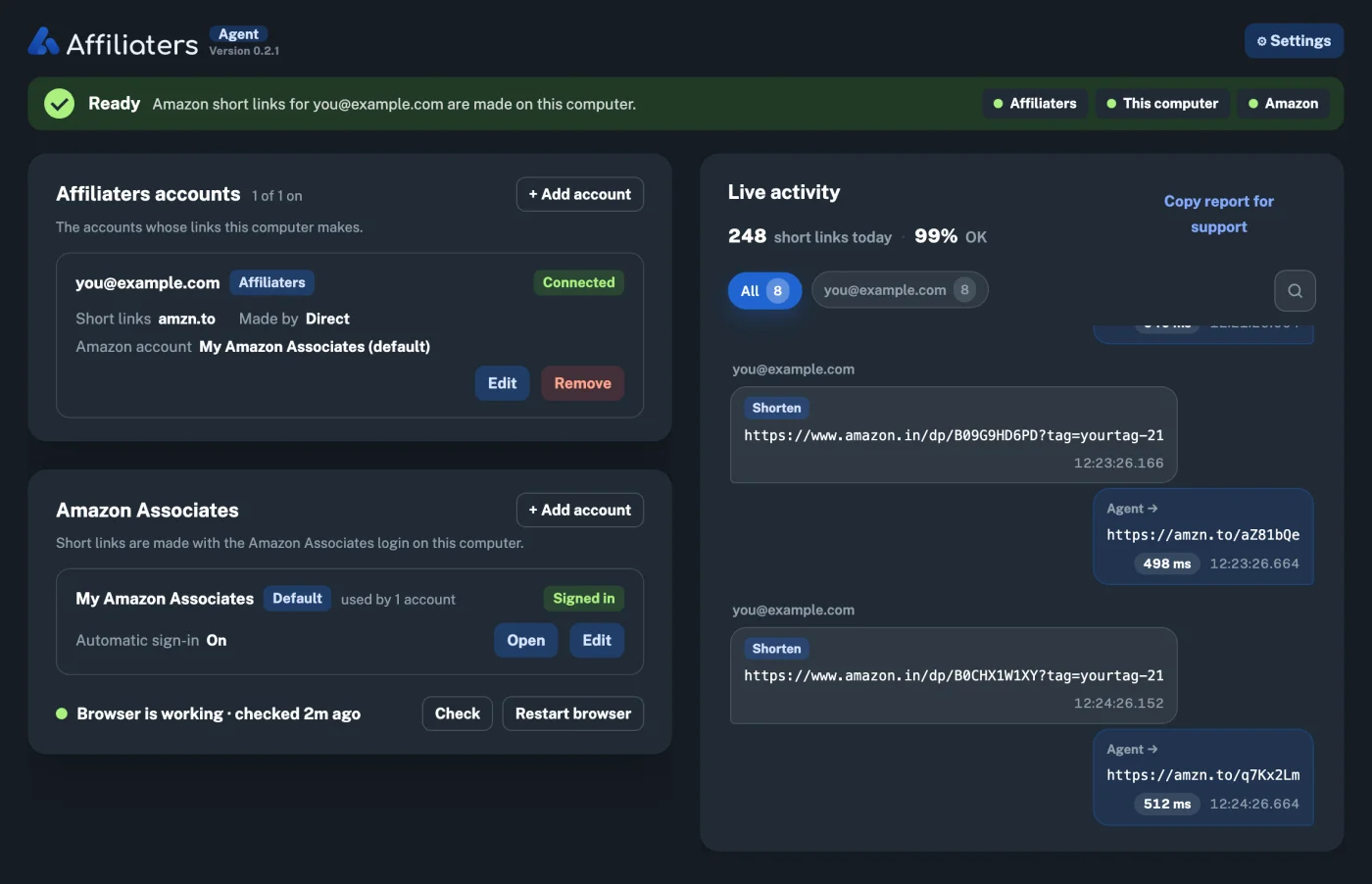
- Live activity — every short link shows up in the app as it's made
- Mac, Windows & Linux — and it updates itself
You convert as always. Your computer does the Amazon part.
Convert like you do today
Paste a deal into the Link Converter, send it to your converter bot, or let the Forwarder pick it up. Nothing about your routine changes.
The Agent asks Amazon
Only the Amazon link is sent to your Desktop Agent. Your computer asks Amazon for the short link with your own Associates login, on your own internet: amzn.to or link.amazon, whichever you picked.
Only the short link comes back
The finished short link drops into your message and posts to every channel and group, in seconds. App closed or Amazon signed out? That link is made the usual way. Nothing breaks.
Three steps to unlimited amzn.to.
A free app, with no extra charge on any plan. Install it on the computer you already use for Amazon Associates.
On your phone? The Desktop Agent runs on a computer. Send this page to yourself and open it on your Mac or PC.
Your free Affiliaters account
The app signs in with it, so make it first. Already have one? Skip to step 2.
Mac
macOS 12 or newer · Apple Silicon or Intel
First time: System Settings › Privacy & Security › Open Anyway.
Windows
Windows 10 or 11 · 64-bit
First time: More info › Run anyway on the blue warning.
Open the app and sign in with the same email and password as the Affiliaters website, then sign in to Amazon Associates once inside the app. It sits in your menu bar or system tray and updates itself. Stuck? The setup guide walks through every screen, or ask @AffiliatersHelpBot.
Download the app only from this page, the Desktop Agent page in your dashboard, the setup guide or our Telegram channel. Never install a copy someone sends you in a group.
A long Amazon link in. A real amzn.to out.
Same amzn.to link. Very different risk.
Anyone who has your cookies is signed in as you. A cookie is a copy of your signed-in Amazon session, handed to a tool you don't control.
They expire. When they do, your links quietly stop being amzn.to until you notice and paste fresh ones.
They're used from a server. Amazon sees your account working from a place it has never seen you sign in.
Your Amazon login never leaves your computer. It's stored encrypted, in the Keychain on Mac, with Windows' own protection on Windows and in the system keyring on Linux.
It signs back in by itself if you choose to save your login in the app.
Links are made on your computer, on your internet — the same place you sign in and check your Associates reports.
Everything about amzn.to, in plain words.
What is an amzn.to link, and what is link.amazon?
amzn.to is Amazon's own short-link domain. When you click Get Link and then
Short link in SiteStripe, Amazon gives you an amzn.to link that opens the product with your Associates tag
inside it. link.amazon is Amazon's newer short format for the same job. Both are made by
Amazon, for your Associates account, and both carry your tag, so the sale tracks to you.
For a deal channel that matters more than it looks. Shoppers in India already know amzn.to means Amazon, so the link doesn't read like spam in a crowded Telegram or WhatsApp group, and it is short enough that chat apps never clip it mid-link.
Why most amzn.to generators stop working
Amazon only hands out amzn.to links to an Associates account that is signed in. A bot or a server can't make one on its own. That's why most tools that promise amzn.to links ask you to paste your Amazon cookies, and that's where the trouble starts:
- The cookies expire, and your links fall back to long URLs until you paste new ones
- Whoever holds them is signed in to your Amazon account
- They're used from a server Amazon doesn't know, not from where you normally sign in
Doing it by hand isn't the answer either. SiteStripe is one product page and one click per link. A good loot post carries three to five Amazon links, and the deal is dying while you click.
How Affiliaters makes unlimited amzn.to links without cookies
We moved the Amazon step onto your own computer. The Desktop Agent is a small app for Mac, Windows and Linux. You sign in to Amazon Associates once inside it, the same way you would in your browser. When you convert a deal on Affiliaters, through the website, a bot or the Telegram Forwarder, we send just that Amazon link to your Agent. Your computer asks Amazon for the short link and only the finished amzn.to or link.amazon comes back to us.
Because nothing is metered, there is no counter to run out. Post ten deals or a thousand: every Amazon link gets its own short link. The rest of the pipeline carries on as before. Your Associates tag is applied, Flipkart, Myntra and network links in the same message are converted too, and the post goes out to Telegram, WhatsApp, X, Facebook and Discord in one go.
amzn.to or link.amazon: which should you pick?
Both are Amazon's own links with your tag inside, so either one earns the same commission. amzn.to is the format most shoppers have seen for years. link.amazon is the newer one. Pick one per account in the app (tap Edit) and change it whenever you like. If you'd rather keep a branded domain for everything else, set Amazon to the Agent and the other stores to your own shortener. Each store can have its own.
One app for every account
Run more than one channel? Add all your Affiliaters accounts and all your Amazon Associates accounts to the same app, then choose which Amazon account makes which account's links. Turn on the backup option and, if one Amazon account gets signed out, your default account keeps the links coming.
Unlimited, and honest about it
Unlimited means Affiliaters puts no number on it. Amazon is a different matter: it can slow down or flag any account, and no tool can stop that. When Amazon says "slow down", your links are made the usual way for about a minute, then the Agent picks up again, so your posts never stall.
We can't call it block-proof, and nobody honestly can. What we did is keep everything as close to you as possible: your own login, your own computer, your own internet, which is exactly what Amazon sees when you use SiteStripe yourself. The Agent is in beta, so expect a few rough edges, and tell us when you hit one.
What you need
- An Affiliaters account on any plan. The Agent costs nothing extra
- An Amazon Associates account for amazon.in
- A Mac (macOS 12 or newer), a Windows 10 or 11 PC (64-bit), or a Linux machine with WebKitGTK 4.1
- Google Chrome works best. Without it, the app downloads its own browser the first time
Download the app from this page, the Desktop Agent page in your dashboard, the official setup guide or our Telegram channel. Never install a copy someone sends you in a group.
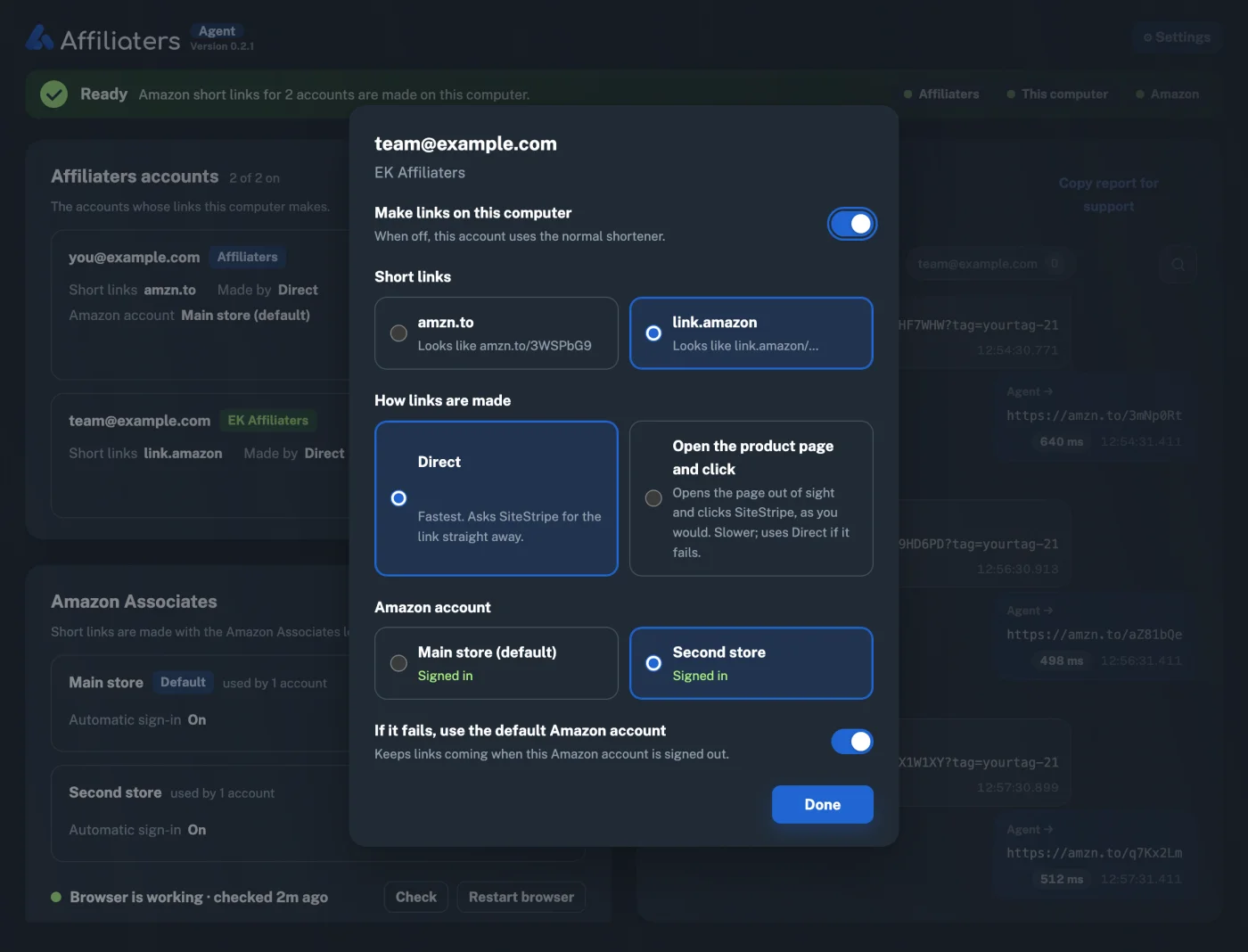
Which Amazon account.
Which short format.
Tap Edit on any account in the app and set it once.
- Short links — amzn.to or link.amazon
- Amazon account — any Associates account you've signed in to
- Backup — fall back to your default Amazon account if this one is signed out
- Off switch — turn it off and that account uses your normal shortener