DISCORD AUTOMATION · WEBHOOKSYour Discord server posts deals without you.
Paste a webhook URL from any channel and it becomes a destination. Every deal Affiliaters converts lands there with your affiliate links already applied — no bot to install, no admin rights to hand over, nothing running on your side.
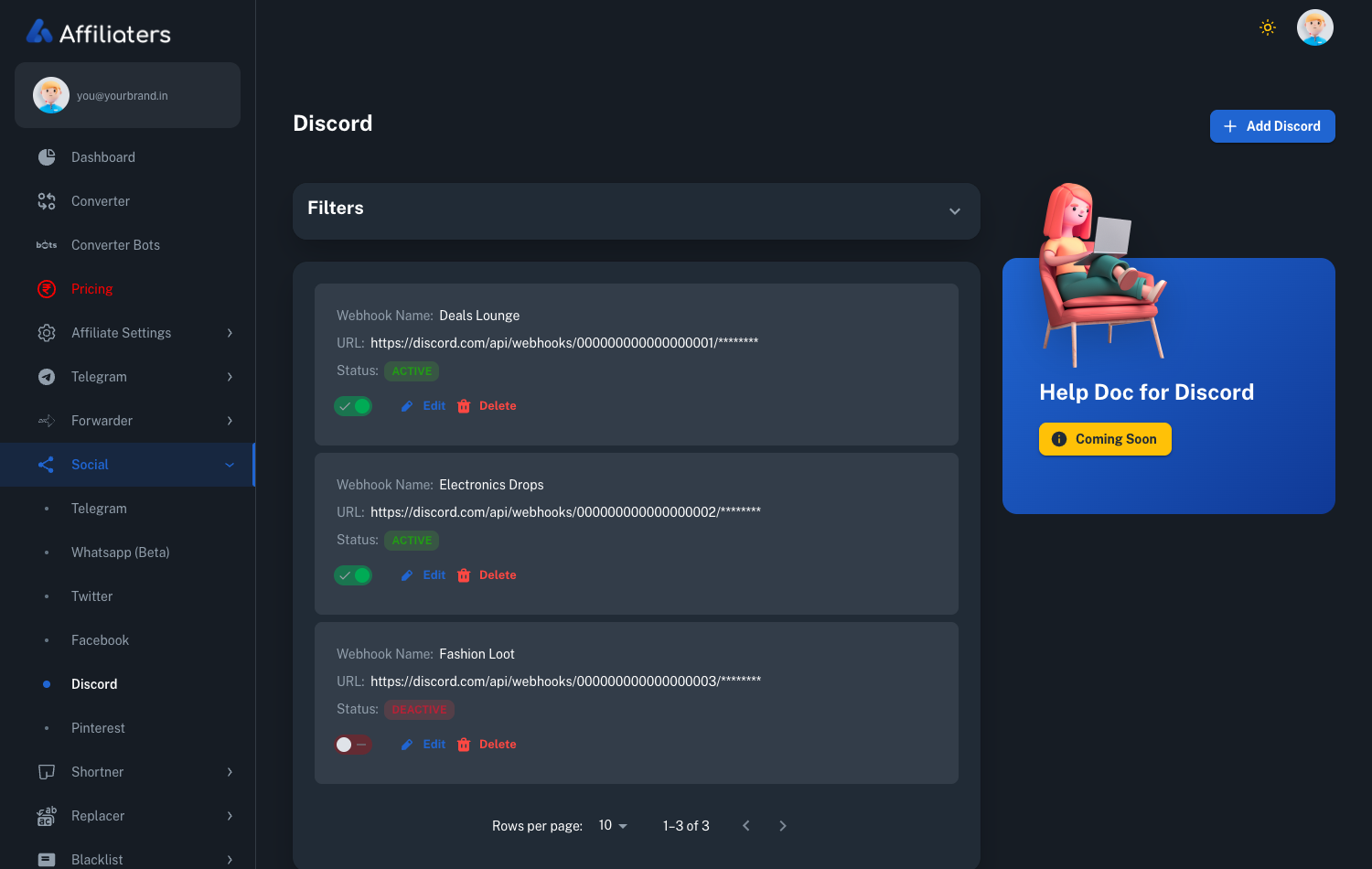
One webhook per channel.
Switch each on or off.
Discord gives every channel its own webhook URL. Paste it, name it something you'll recognise later, and deals start arriving. Add as many channels as you run.
- Name every webhook — so you know which channel is which at a glance
- Active or inactive per channel — pause one without touching the others
- Edit or delete any time — and the secret half of the URL stays masked on screen
- No bot, no OAuth, no server permissions — a webhook is all Discord asks for
Three steps, and it's done for good.
Copy a webhook from Discord
In your server: Edit Channel → Integrations → Webhooks → New Webhook → Copy Webhook URL. Discord builds this feature in; you are not working around anything.
Paste it into Affiliaters
Give it a name, save, and that channel is now a destination. Repeat for every channel that should receive deals — each one keeps its own on/off switch.
Deals arrive on their own
Everything the converter or the Forwarder processes posts through, carrying your affiliate IDs, your message template, and your Replacer and Blacklist rules.
The channel with nothing to warn you about.
Most of the automation on this site comes with a caveat. WhatsApp posting is beta and Meta can restrict the number. The Telegram Forwarder signs in as your own Telegram account and Telegram may limit accounts that automate. We say so on those pages because it is true.
Discord is the exception, and it is worth being clear about why. A webhook is Discord's own documented way to let an outside service post into a channel. You create it, you own it, and you can delete it in the same three clicks it took to make. There is no bot sitting in your server, no OAuth scope list, no permission you are trusting us with, and no rule you are quietly breaking. If you ever want it gone, remove the webhook in Discord and the connection dies at your end, not ours.
Where it fits if you already run Telegram
Deal communities rarely live in one place. A channel on Telegram and a server on Discord attract different people, and the ones on Discord tend to stay to talk — which is exactly the audience worth posting a good price to. The point of Affiliaters is that this costs you no extra work: one conversion fans out to every destination you have switched on, so adding Discord is a one-time setup, not a second posting routine.
Each channel keeps its own switch, so a server with a general deals room, an electronics room and a fashion room can take all three, or just the one you want busy this week. Everything else — link conversion across your networks, short links on your own domain, Replacers, Blacklist — applies before the message ever reaches Discord.
If the webhook changes later
A webhook is a URL, and everything about how it behaves follows from that. Delete it in Discord and posting to that channel simply stops — Discord does not warn you, and nothing in your server breaks. Create a new one, paste it in, and the channel picks up where it left off. Regenerating a webhook has the same effect as deleting it: the old URL stops working immediately, so the new one has to be pasted in here too.
Renaming the channel, or moving it into a different category, changes nothing. The webhook is bound to the channel itself rather than its name, so the deals keep arriving. Deleting the channel does end it, because the webhook goes with it.
To create one at all you need the Manage Webhooks permission on that channel. If you own the server you already have it; if someone else does, they can either grant it or create the webhook and hand you the URL — the URL is the only thing Affiliaters needs. Treat it like a password: anyone holding it can post into that channel, which is precisely why it is also so easy to revoke.
Because each channel has its own webhook, the switches here are genuinely independent. Turning one channel off does not touch the others, and a webhook that has gone stale only affects the channel it belongs to — the rest of your server carries on.
What it costs
Discord is included on every plan — there is no addon and no per-channel charge. Compare what else each plan includes on the pricing page. Setup is covered in the docs, or ask @AffiliatersHelpBot — a human answers.