Telegram Auto-Forwarder for Affiliate DealsThe 2 AM deal? Already posted.

Log in with your own Telegram number, pick the source channels you already follow, press Start Forwarding — and every deal that drops gets its links converted to your affiliate IDs, cleaned by your Replacers, checked against your Blacklist and posted to all your channels & groups, images included, 24×7.

01 / LIFE OF A FORWARDED DEAL

You were asleep. It wasn't.

Affiliaters · forwarder — live log
23:14:02DEAL detected in @AnyDealsChannels — Noise Buds VS104 @ ₹899 23:14:02CONV fkrt.in/xY2mQw → deals.yourbrand.in/nZ48 [affid=yourid] 23:14:03TEXT replacers applied · blacklist clear · image attached 23:14:04POST → all your Telegram channels ✓ 23:14:04POST → your WhatsApp groups ✓ · X ✓ · Facebook ✓ 23:14:04DONE posted everywhere — owner status: sleeping 😴 23:21:56💰 first click from your channel converted.
02 / THE SOURCES YOU WATCH

Pick the channels.
Then walk away.

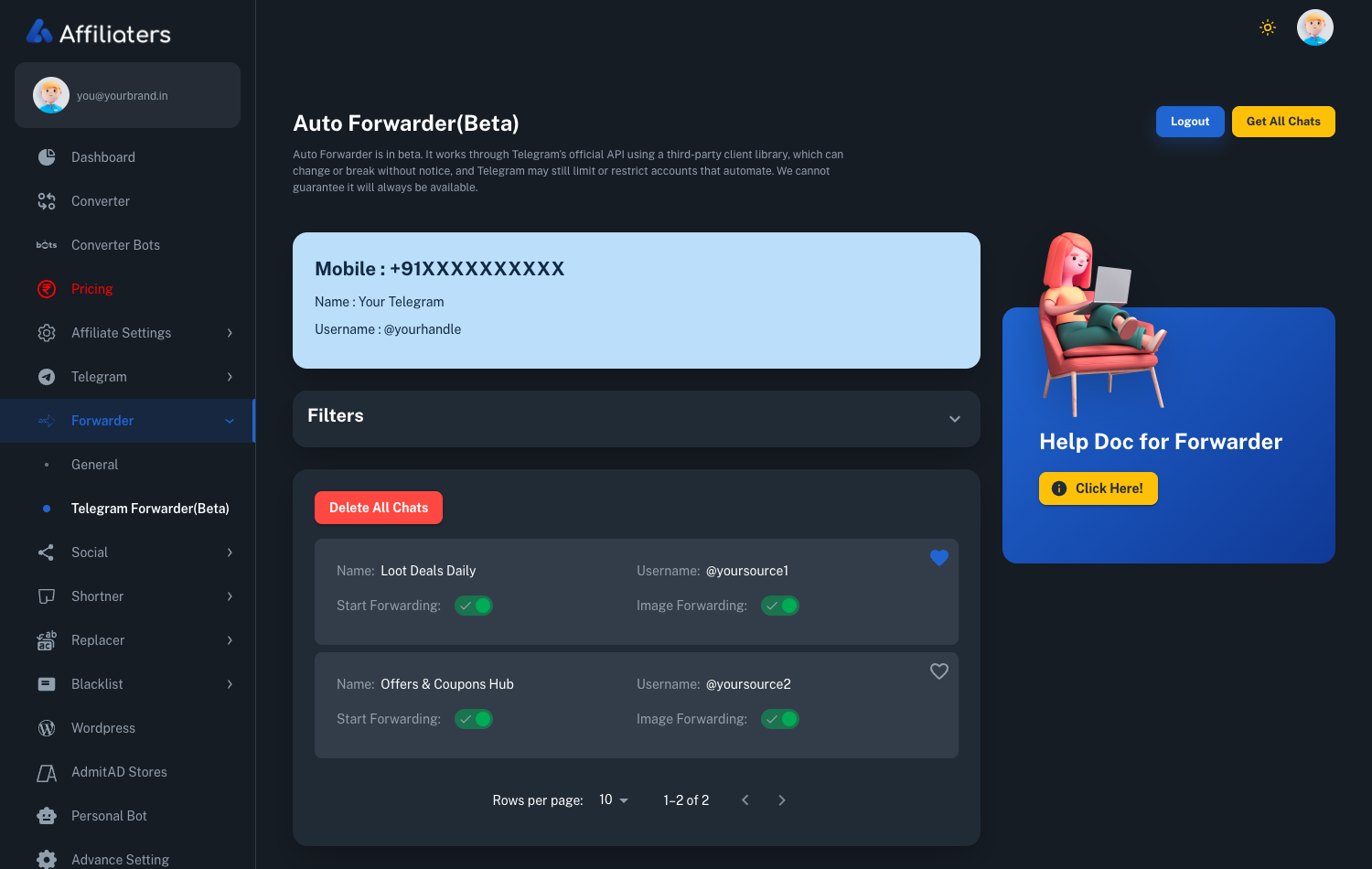
Connect your Telegram account, press Get All Chats, and every channel you already follow lands in one list. Switch Start Forwarding on for the ones worth watching — the Forwarder handles the rest, day and night.

  • One list, all your chats — nothing to hunt down, no channel IDs to paste in by hand
  • Two switches per source — forward the text, and choose whether the image comes along
  • Pause without deleting — turn a noisy source off for a week and back on when it matters
  • Beta, and we say so — the screen carries the same warning about Telegram automation risk you see here
Where the deals land →
app.affiliaters.in/forwarder/telegram
Affiliaters Telegram Forwarder screen listing source Telegram channels with Start Forwarding and Image Forwarding toggles
03 / BUILT-IN SOURCES

No source channels yet?
Start with ours.

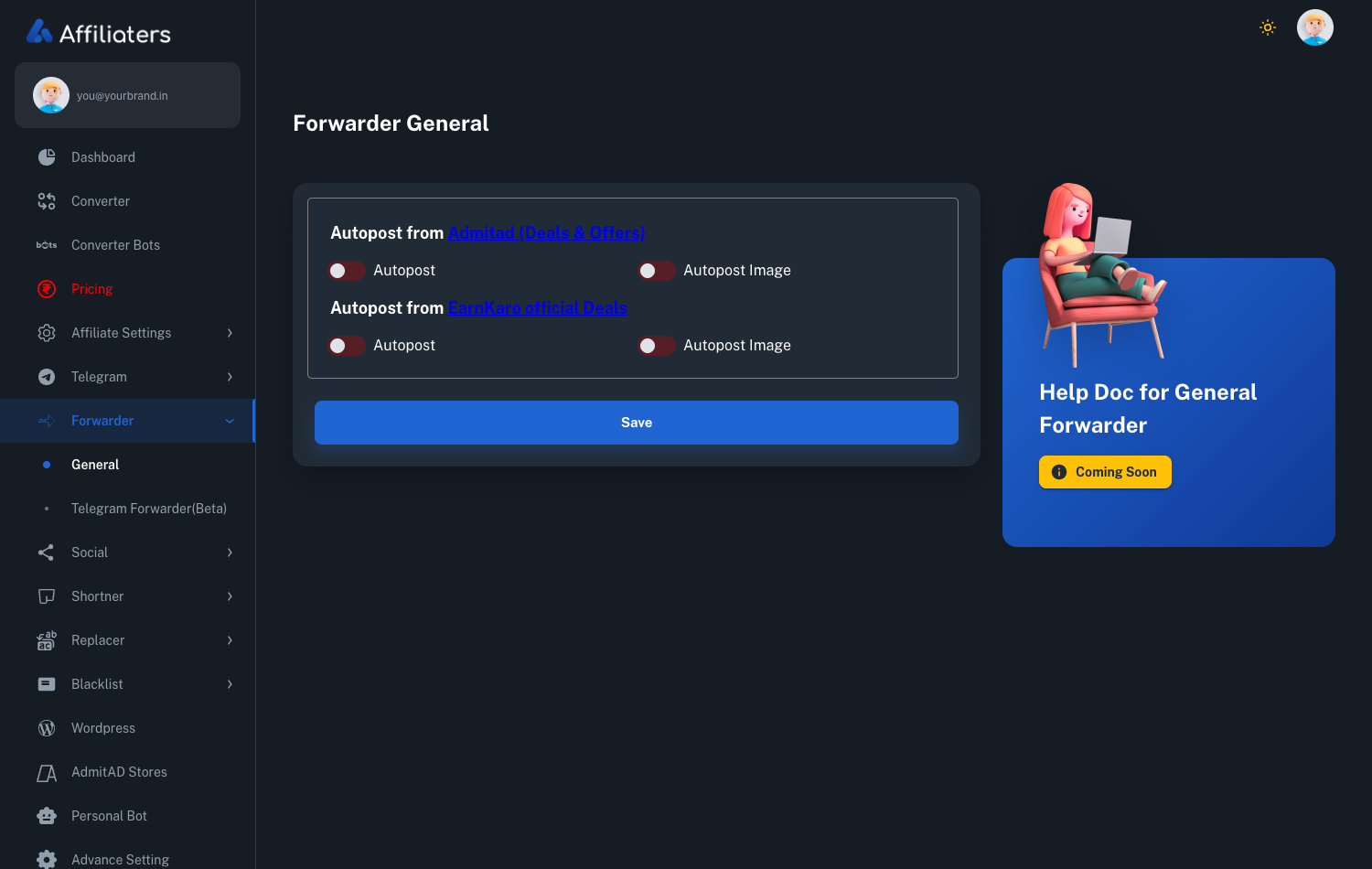
Under Forwarder → General there are ready-made feeds from the networks themselves — Admitad Deals & Offers and EarnKaro official Deals. Flip Autopost on and deals start flowing before you have found a single channel of your own.

  • Nothing to log into — these sources are already wired up; you only pick whether to use them
  • Two switches eachAutopost for the deal text, Autopost Image for the picture
  • Still your links — every deal runs through the converter first, so the affiliate IDs are yours
  • Mix and match — run these alongside your own source channels, or on their own
app.affiliaters.in/forwarder/general
Affiliaters Forwarder General screen with Autopost and Autopost Image switches for the Admitad and EarnKaro official deal feeds
04 / THE CONTROL PANEL

The Forwarder runs alone —
but it runs on your rules.

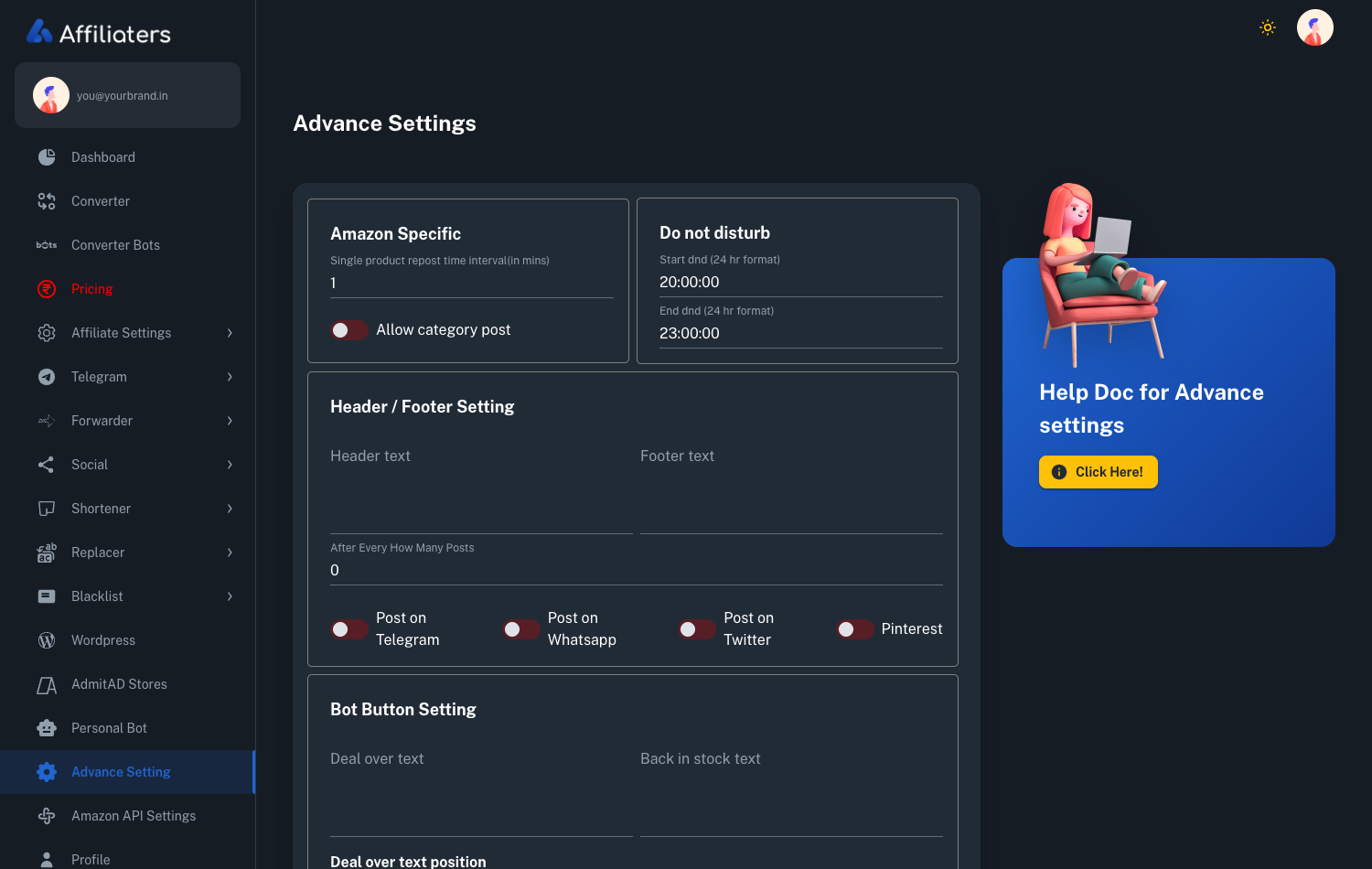
Once it is watching your source channels, everything about how a deal goes out is a setting you own: quiet hours, repost gaps, header and footer lines, and the buttons under each post.

  • Do not disturb — set start and end hours and the channel stays quiet
  • Repost interval — stop the same product going out again too soon
  • Header & footer text — your channel branding on every post, every N posts
  • Bot button text — 'Deal over' and 'Back in stock' labels are yours to write
app.affiliaters.in/advance-setting
Affiliaters advance settings screen showing do-not-disturb hours, header and footer text and bot button settings
05 / SETUP

Three steps. Then the bot takes over.

01

Login with your number

Enter your Telegram number in the dashboard. An OTP arrives inside your Telegram app — type it in, add your 2FA password if you use one. Your account, your control.

02

Pick your sources

Hit Get All Chats and tick the deal channels you already follow. Those become the sources the Forwarder watches round the clock.

03

Start Forwarding

One click. Every deal gets converted to your IDs, Replacers applied, Blacklist respected, images included — and posted to all your channels & groups, 24×7.

06 / THE FULL PICTURE

Everything the Forwarder does, in plain words.

Every deal channel owner knows the routine: source channels post the loot at midnight, and whoever forwards it first — with working affiliate links — wins the clicks. The Affiliaters Telegram Forwarder exists so that person is always you — even when you're at work, out with family, or asleep. You built the audience; you shouldn't have to babysit a phone to keep it.

What is the Telegram Forwarder?

It's a Telegram auto forwarder built specifically for affiliate deals. It sits in the cloud, watches the source Telegram channels you pick, and the moment a message lands it goes to work: every store link inside — Amazon.in, Flipkart, Myntra, EarnKaro, Admitad, Cuelinks, Shopsy or any other connected network — is converted to your own affiliate link, shortened on your own domain shortener (Bitly and Cuttly work too), and the finished post goes out to all your channels and groups automatically. Images come along for the ride.

That conversion step is what separates it from a generic Telegram forwarder. A plain forwarder copies the message as-is — with the source channel's affiliate IDs still inside, so their commission keeps ticking while your channel does the distribution. The Telegram Forwarder converts first and forwards second. Every link that reaches your audience carries your tag, your token, your ID. The commission tracks to your accounts, and Affiliaters takes no cut — same promise as the Link Converter it's built on.

How it works, step by step

Setup is a one-time job — a few minutes even if you type slowly. Here's the exact flow inside the dashboard:

  • Log in with your Telegram number. The Forwarder runs on your own Telegram account, not some shared bot — that's what lets it read the source channels you already follow.
  • Enter the OTP. Telegram sends a login code straight to your Telegram app. Type it into the dashboard.
  • 2FA? Supported. If you've enabled two-step verification, you'll be asked for your 2FA password as well.
  • Hit "Get All Chats". The Forwarder pulls in every channel and group your account can see.
  • Pick your source chats. Tick the deal channels you want watched — the ones that post the loot you'd normally repost by hand.
  • Press Start Forwarding. Done. Close the tab.

From that second onwards, every message in your sources is processed automatically: links converted to your affiliate IDs, your Replacers applied to the text (swap the source's channel name for yours, add your promo line), your Blacklist respected — words, stores or links you never want posted simply don't go out — and images forwarded along with the message.

What happens when a deal drops

What the Forwarder does when a deal drops Five steps, none of them yours: a source channel posts a deal, the Forwarder detects it on your own Telegram account, every store link is rebuilt with your affiliate IDs, the links are shortened on your domain and passed through your Replacers and Blacklist, and the finished post goes out to every channel and group you have connected. 11:47 PM Source posts A loot lands in a channel you use DETECT Detected On your own Telegram account CONVERT Tagged Every link, your affiliate accounts CLEAN Cleaned Your domain, Replacers applied 11:47 PM Posted Every channel and group, all at once
Nobody pressed anything. Same shortener, same Replacers, same Blacklist as a post you'd send by hand.

Say a source posts an earbuds loot at 11:47 PM. The Forwarder detects the message, converts the store link to your ID, shortens it on your domain, runs your Replacers, checks the Blacklist, attaches the image and pushes the post out. One blast reaches every channel and group you've connected, within seconds of the source posting it. The live log at the top of this page shows what that looks like from the inside. Your post lands while the deal is still hot.

And because it's the same pipeline behind every Affiliaters post, nothing about the output changes when a human isn't driving: same shortener, same Replacers, same Blacklist, same formatting your subscribers already recognise. The only difference is who pressed send — and at 2 AM, nobody did.

Use it responsibly

The Forwarder logs in as you — that's its superpower, and it's also your responsibility. Because it runs on your own Telegram account, heavy or careless automation carries some risk of account restrictions from Telegram's side. Our docs say this plainly, and so do we. Keep your source list to channels you actually need, don't turn your account into a spam cannon, and read the Telegram Forwarder guide before going all-in. If anything looks off, message @AffiliatersHelpBot — a human answers.

How to get the Telegram Forwarder

Two ways: it comes included with the top plan, or you bolt it onto any active plan as the Forwarder addon. Which route makes sense depends on what else you need — the pricing page has the full comparison.

Either way, it slots straight into the rest of your setup: Telegram automation handles your destination channels, the networks hub covers connecting each affiliate account, and every forwarded deal still runs through your shortener, Replacers and Blacklist. More questions? The FAQ has the honest answers.

Wake up to posts
already sent.

Switch on the Telegram Forwarder tonight — a few minutes of setup, then every deal your sources drop lands on your channels with your links.

Create your account → Compare plans

Forwarder questions? Ask @AffiliatersHelpBot — a human answers.