Browser Extension · Affiliate Link ConverterConvert the deal
on the product page.
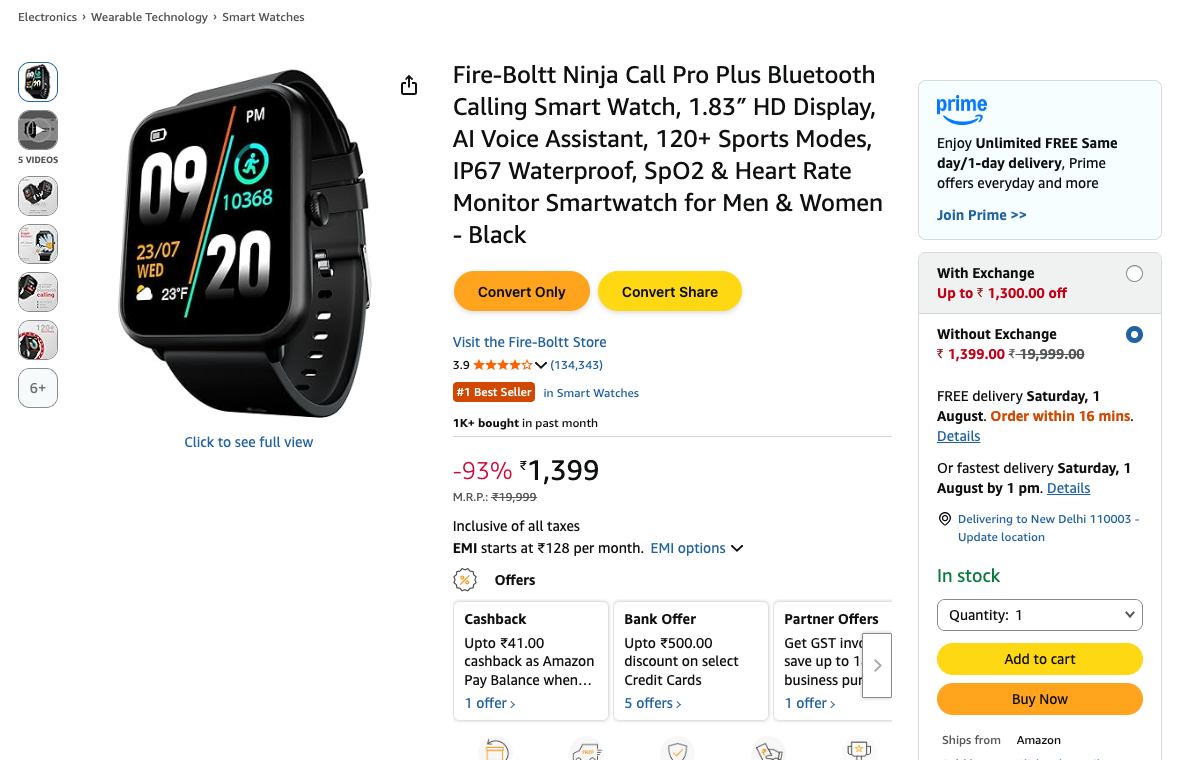
Affiliaters Deal Converter adds two buttons to Amazon.in, Flipkart, Myntra, Croma and Shopsy: Convert Only and Convert & Share. It reads the product you are looking at, writes the deal message in your own format, swaps in your affiliate link — and posts it, without you opening another tab.
Free with your account 5 shopping sites Live on the Chrome Web Store
Two buttons, exactly where
you already are.
No copying the URL into another tab, no switching to the dashboard. You are on the product page — so the convert button is on the product page.
- Convert Only — get your affiliate link and the finished deal text back
- Convert & Share — convert and post to your channels in the same click
- Amazon.in, Flipkart, Myntra, Croma, Shopsy — product pages and listing pages
- Nothing runs anywhere else — the extension only wakes up on those five sites
Title, price, MRP, coupon,
bank offers — picked up for you.
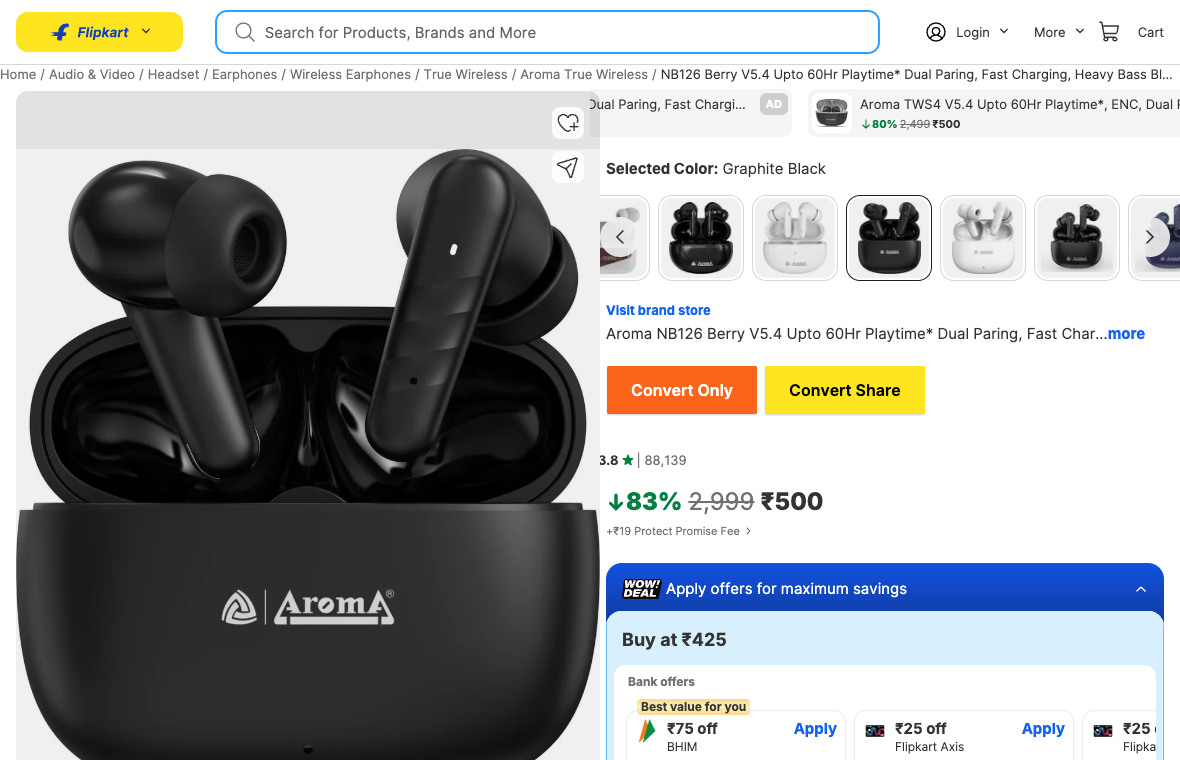
Open the extension on a product page and the deal is already written. It pulls the details straight from the page you are on, then renders them into your own message format — so the post is accurate and in your words the first time.
- Auto-filled deal text — product name, price and buy link, ready to go
- Card & bank offers — Flipkart Best Value and Amazon card offers are read too
- Your own template — 17 placeholders for title, price, MRP, coupon and card offers; write the format once under Settings → Message format
- Math and conditions — work out the pay-after-offer price, and drop lines like “Coupon:” entirely when a product has none
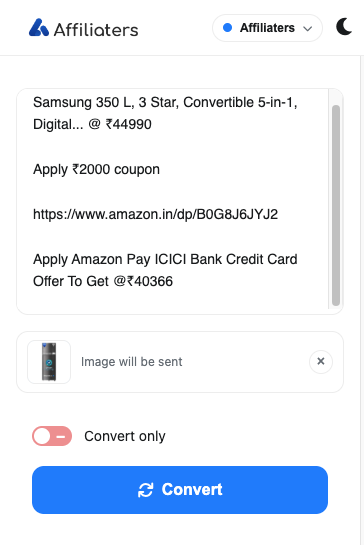
- History — every conversion is saved, so you can find and reuse it later
Write the template once.
Every deal comes out formatted.
This is the part that makes the extension worth installing. It doesn't just hand you a link — it renders the details it read into your message format. Your wording, your emoji, your line order, on every deal.
# Settings → Message format
🔥 {{title}}

💰 Now {{price}}  (MRP {{mrp}})
📉 {{off}} off — you save {{discount}}
{{if coupon}}🎟️ Coupon: {{coupon}}{{endif}}
{{compose '💳 ', card_bank, ' ', card_type, ' — ', card_off, ' off'}}
{{if card_off_amt}}➡️ Effective {{math price - coupon_amt - card_off_amt}}{{endif}}

🛒 {{link}}
No coupon on this product? That line disappears — you never get “Coupon:” followed by nothing.
💰 Now ₹1,199 (MRP ₹7,999)
📉 85% off — you save ₹6,800
🎟️ Coupon: ₹100
💳 HDFC Credit — ₹150 off
➡️ Effective ₹949
🛒 https://deals.yourbrand.in/fB19
💰 Now ₹999 (MRP ₹4,990)
📉 80% off — you save ₹3,991
🛒 https://deals.yourbrand.in/aD44
Seventeen things the page gives you
Every detail the extension can read is available as a placeholder. Use what you want, ignore the rest.
The product
{{title}}Full product title{{name}}Shorter name, where the store gives one{{price}}Selling price right now{{mrp}}Struck-through list price{{link}}Your affiliate link — required{{website}}Which store it came from
Worked out for you
{{off}}Discount as a percentage{{discount}}Rupees saved against MRP{{finalprice}}What you actually pay after the coupon{{coupon}}Coupon as the store words it{{coupon_amt}}Just the coupon number, for maths
Bank & card offers
{{card_bank}}HDFC, ICICI, Axis …{{card_type}}Credit or Debit{{card_offer}}The whole offer line as written{{card_off}}The discount, % or ₹ as the store states it{{card_off_pct}}Percentage only{{card_off_amt}}Rupee amount only
It decides, and it does the maths
Most “templates” are find-and-replace: swap a token for a value, and print an empty label when there's nothing to swap in. Three constructs stop your posts reading like a form with gaps in it.
{{if}} … {{else}} … {{endif}} tests whether a field
came back at all, or compares numbers — and blocks can nest, so one template can behave
differently per store or per discount size.
{{if card_off_pct >= 5}}
Pay {{math price - card_off}}
{{endif}}
{{math}} works out the figure you actually want to advertise — the price after
a coupon, after a card offer, or both. Only + - * / are allowed, so a template
can't do anything surprising.
{{math price - coupon - card_off}}
{{math finalprice - card_off_amt}}
{{compose}} joins literal text and fields into one line — and if the fields are
empty, the whole line vanishes rather than leaving stray words behind.
{{compose 'Apply ', card_bank, ' ', card_type, ' to get ', card_off}}

→ Apply HDFC Credit to get 10%
→ Apply Flipkart Axis Credit to get ₹4000
Then your account delivers it
The template runs the moment you hit Convert, and the finished text goes to your Affiliaters account, which converts every link with your own affiliate IDs, shortens it on your own domain, applies your Replacer and Blacklist rules, adds your header and footer, and posts it to Telegram, WhatsApp, X (Twitter), Facebook, Discord and WordPress. The extension formats; your account delivers.
Two honest notes
Everything here is read off the retailer's own page. If a product has no coupon,
{{coupon}} is empty — fine, because {{if}} and
{{compose}} drop those lines. But if a store redesigns its markup, a field can
start coming back empty until we catch up. Your post still goes out, just without that line,
so don't hang the essential information on the most fragile field.
And {{link}} is not optional — the editor tells you when it's missing, because
a beautifully formatted deal post with no affiliate link in it earns you nothing.
Everything is off until you turn it on.
Per shopping site, you decide whether the convert buttons show and whether product images are attached. Nothing is enabled by default — a store does nothing at all until you switch it on, and the off switch is always in the same place.
Small extension. Long feature list.
Your message format
Price, MRP, discount %, coupon line, bank offers, final price — arranged exactly how your channel writes deals.
Card & bank offers read too
Flipkart Best Value and Amazon card offers are picked off the page, so the pay-after-offer price in your post is the real one.
Math and conditions
Calculate the price after an offer, and show a line only when it matters — per store, per discount, your rules.
Conversion history
Every deal you convert is kept in the extension. Copy an old one again without hunting for the product page.
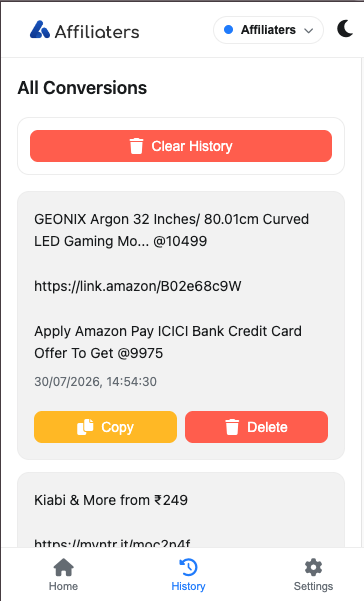
Product image included
The product photo comes along with the deal, with a one-tap ✕ if you would rather send text only.
Paste anything, anywhere
The popup works on every site, not just the five stores — paste a link or a whole deal message, hit Convert, and get your version back. No product page needed.
About a minute, start to finish.
Add it from the Web Store
One click on Add to Chrome — no ZIP, no developer mode, no folder to keep anywhere. Chrome updates it for you from then on.
Pin the icon
Click the puzzle-piece icon in the toolbar and pin Affiliaters Deal Converter so it is one click away on any product page.
Connect your account
Open it, pick your platform and hit Authorize. It uses the Affiliaters account and affiliate IDs you already have.
Switch on your stores
Under Settings → Shopping sites, turn on the convert button for the stores you actually post from. Everything starts off.